FFR Photoshop Resources/Tutorial Thread

Collapse
This is a sticky topic.
X
X
 
  • Time
  • Show
Clear All
new posts
  • RuGuru
    FFR Veteran
    • Oct 2011
    • 397

    #1

    FFR Photoshop Resources/Tutorial Thread

    The Official FFR Photoshop Tutorial/Resources Thread

    Purpose of this thread:
    To help people broaden their resources when it comes to Photoshop. It also allows new artist, and original ones to share and discover new techniques that could help spark some new creativity.

    http://www.photoshop.com - Interested in Photoshop; here is their main website.
    http://www.gimp.org/ - Free photo editing software (PS Brushes do not work with GIMP)

    Rules in this thread
    1. - You may showcase any art that you have.
    2. - Be positive and constructive.
    3. - Do not flame people's art work, or people who are simply trying to learn. Keep the drama out of this thread.
    4. - Have Photoshop.
    5. - Do not request for profiles in this thread. That is what the FFR Profile Shop is for.
    6. - When posting someone's tutorial or art, be sure to give them credit.
    7. - Leave your ego out the door.


    Resources
    Cheat sheets.
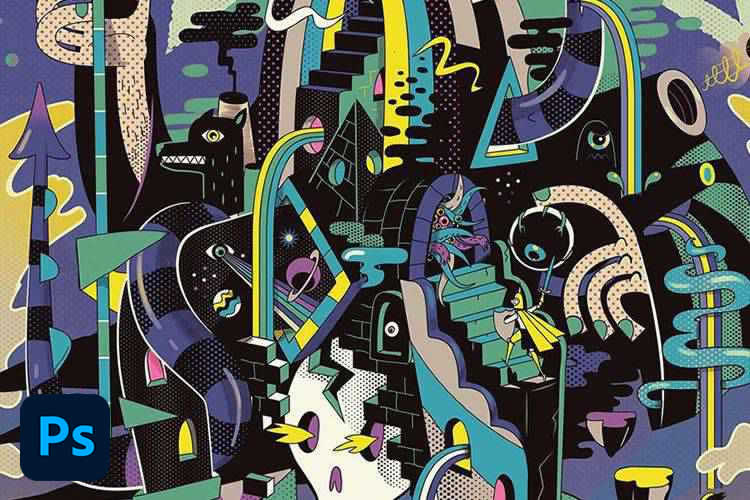
    This huge collection of Photoshop tutorials for digital artists includes painting, drawing, photo manipulation, and poster design.


    Brushes


    Gradients


    Patterns


    Fonts


    Tutorials
    How To make a Gradient - By RuGuru
    Photoshop Basics 101: How to make a gradiant

    I'm going to try to make this the most interesting way I can.
    There will be another addition to gradiants just some tricks. Anywhoos lets start!


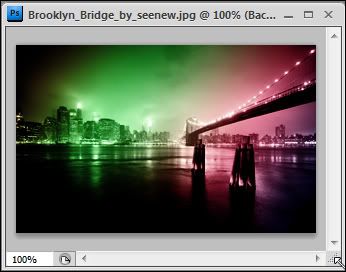
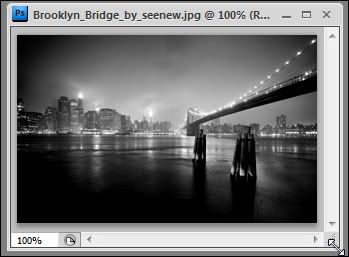
    Lets start with a simple gradiant, to colorize this image.


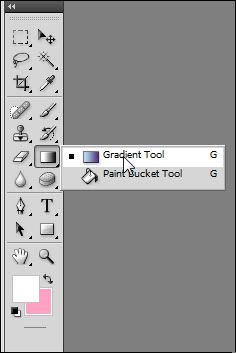
    Lets start out by finding the Gradiant tool! In photoshop there are a lot of tools hidden within the tool window. The gradiant tool should be behind the Fill tool. Just simply right click the fill tool and you'll see a window pop up to select the gradiant tool.

    However, perhaps the gradiant tool is already set on the tool window. Then you're already a step ahead! D:


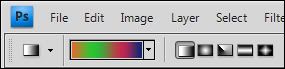
    Then at the top of the screen you will see the gradiant options. Seeeee it?


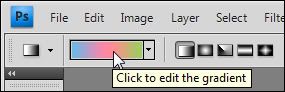
    Click on the gradiant for more gradiant options! This is where the magic begins.


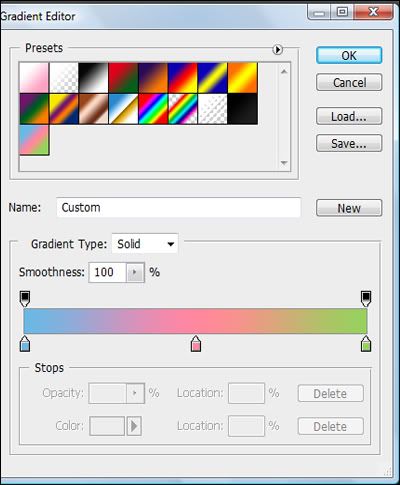
    And vavooom more gradiant options! Now we can start.


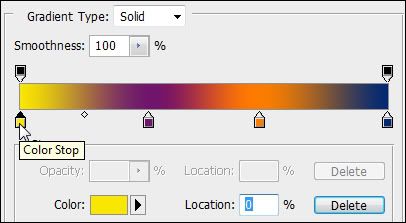
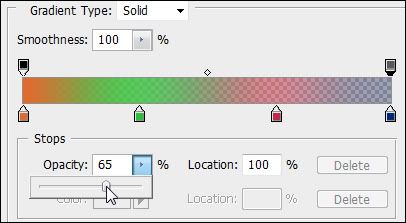
    Now lets set the colours. See the points near the colour bar? You can move those around to change your gradiants


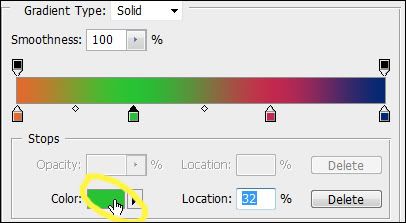
    Now how do to choose your own colours? Click one of the points on the colour bar then click the colour in the color</c> box. As shown in the image.


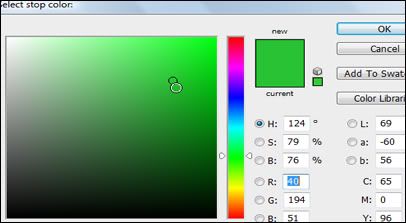
    Then you simply choose your colour. Also if you move the cursor outside the window the eye dropper tool will be shown, and you can select the colour your want from the image! (I'll explain this better in another gradiant tutorial)


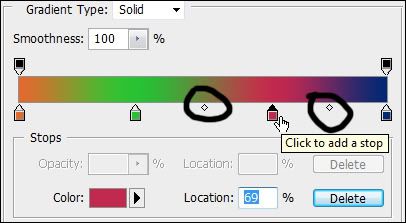
    I forgot to mention the tiny points on the colour bar. You can stretch or shrink out the colour of the points with those. Just move them around.


    The top points of the color bar represent the opacity. You can adjust the transparency of the gradiant here. (I will also show a tip about this in another tutorial).


    Next you will need to save your gradiant! Or it will disappear D:.

    You dont have to make a name for it. You can simply just press the New button and the gradiant will be saved.


    Like in this image you can see my saved gradiant! (Lol @ one - i had to reset my photoshop since i got a new laptop)

    Then finally just use your gradiant, in gradiant overlay or such and such.


    And ta da


    How to make your avatar match your background - By Emithith


    Showcase


    If you have questions or want to get in touch, add me on my Skype. Iamruguru

    ~Still updating with more Photoshop goodies!
    Last edited by darkshark; 04-24-2012, 09:53 PM.
  • Mau5
    FFR Player
    • Nov 2011
    • 790

    #2
    Re: FFR Photoshop Resources/Tutorial Thread

    Wewttt this shall be great,

    Edit:
    For free photo editing software: http://www.gimp.org/
    For payed photo editing software: http://www.photoshop.com/
    Last edited by Mau5; 04-5-2012, 07:58 PM.
    How to start an argument online:
    Step 1) Express an opinion
    Step 2) Wait....

    Originally posted by Arntonach
    It's great to see how the internet works, it's mask of anonymity bringing out the worst in people.

    Comment

    • Gundam-Dude
      `~`
      FFR Simfile Author
      • Oct 2005
      • 7327

      #3
      Re: FFR Photoshop Resources/Tutorial Thread

      talk to me about typefaces and typography in general

      just throwing that out there as a designer


      (Download My Magnum Opus, Solo Kpop Pack!)

      My Simfiles (4key & 6key)

      Comment

      • RuGuru
        FFR Veteran
        • Oct 2011
        • 397

        #4
        Re: FFR Photoshop Resources/Tutorial Thread

        Originally posted by Gundam-Dude
        talk to me about typefaces and typography in general

        just throwing that out there as a designer
        I never tried it before lol. If you have experience in it, maybe you could post some stuff to put into the thread.

        Updates:
        * Two tutorials have been posted.
        * More additional websites for resources
        Last edited by RuGuru; 04-5-2012, 09:07 PM.

        Comment

        • Renevatia
          FFR Veteran
          • Feb 2006
          • 555

          #5
          Re: FFR Photoshop Resources/Tutorial Thread

          I like the idea of this thread but I think this would be better fit in the 32bit section?
          Reminder for self to make new sig.

          Comment

          • bmah
            shots FIRED
            Profile Moderator
            FFR Simfile Author
            Global Moderator
            • Oct 2003
            • 8448

            #6
            Re: FFR Photoshop Resources/Tutorial Thread

            Moved thread to 32-bit RGB forum and stickied it. I'm sure this will be very useful to many users.

            Comment

            • C1004A
              Banned
              • Apr 2012
              • 197

              #7
              Re: FFR Photoshop Resources/Tutorial Thread

              what's the best way to go about learning photoshop?
              should i just look at some basic tutorials and start playing around with ps

              or does anybody have a really useful manual-like all-in-one guide in a neat website or pdf format? ;o i figured since ps has so many functions and tricks, i couldnt possibly figure them out all on my own

              Comment

              • darkshark
                Nothing.
                • Nov 2004
                • 4189

                #8
                Re: FFR Photoshop Resources/Tutorial Thread

                Best way to learn all the tools and keyboard commands

                This huge collection of Photoshop tutorials for digital artists includes painting, drawing, photo manipulation, and poster design.


                It's a bunch of cheat sheets, really helpful in getting to know the program.

                Comment

                • C1004A
                  Banned
                  • Apr 2012
                  • 197

                  #9
                  Re: FFR Photoshop Resources/Tutorial Thread

                  thanks ds ;D

                  Comment

                  • vidyamohhls
                    FFR Player
                    • Dec 2014
                    • 4

                    #10
                    Re: FFR Photoshop Resources/Tutorial Thread

                    There are good information about photoshop tutorial.

                    Comment

                    • Shem-
                      FFR Player
                      • Dec 2014
                      • 24

                      #11
                      Re: FFR Photoshop Resources/Tutorial Thread

                      As weird as it is me being into Web Design, I've never fooled around with Photoshop!

                      Getting it now, so thanks for this thread
                      Milestones:

                      Otaku Speedvibe [Heavy] - 12/29/14

                      Comment

                      • Arntonach
                        Owlbears Rock!
                        • Mar 2012
                        • 2494

                        #12
                        Re: FFR Photoshop Resources/Tutorial Thread

                        Nice bump. Shame this went nowhere. :<
                        pack of hard stuffs

                        pack of my stuffs

                        Comment

                        • choof
                          Banned
                          FFR Simfile Author
                          • Nov 2013
                          • 8563

                          #13
                          Re: FFR Photoshop Resources/Tutorial Thread

                          can someone send me helvetica so i can make gfx for solo rulz 3

                          Comment

                          • lurker
                            ur worst nitemare
                            FFR Simfile Author
                            • Jan 2003
                            • 1628

                            #14
                            Re: FFR Photoshop Resources/Tutorial Thread

                            sorry mang helvetica's outta stock
                            we just got a fresh shipment of birth of a hero though
                            some feathery f**k

                            Comment

                            • choof
                              Banned
                              FFR Simfile Author
                              • Nov 2013
                              • 8563

                              #15
                              Re: FFR Photoshop Resources/Tutorial Thread

                              i already have all the grunge fonts from dafont

                              Comment

                              Working...