
Spyware issues

Collapse
X
 
  • Time
  • Show
Clear All
new posts
  • rshadow8888
    FFR's Buizel
    FFR Simfile Author
    • Aug 2005
    • 3120

    #1

    Spyware issues

    I have no idea what happened, but when I logged on to the internet this morning, I got like 100 pop-up tabs. I have downloaded and used adware, spybot, and avg (there were Trojans too). The pop-ups are a little less frequent now (once every 15 mins or so), but it also shuts my internet down each time too. Anyone have a little advice?
  • ~HentaiXXX~
    Banned
    • Apr 2007
    • 2955

    #2
    Re: Spyware issues

    ¯\(◕_◕)/¯

    Comment

    • Synthlight
      Administrator
      FFR Simfile Author
      FFR Administrator
      • Nov 2002
      • 3057

      #3
      Re: Spyware issues

      Grab windows defender, spysweeper and Xoftspy while you are at it.

      Cheers,

      Synthlight

      Comment

      • jewpinthethird
        (The Fat's Sabobah)
        FFR Music Producer
        • Nov 2002
        • 11711

        #4
        Re: Spyware issues

        or buy a mac.

        Comment

        • rshadow8888
          FFR's Buizel
          FFR Simfile Author
          • Aug 2005
          • 3120

          #5
          Re: Spyware issues

          Originally posted by jewpinthethird
          or buy a mac.
          If I had money I would just pay someone to fix this damn computer for me.

          lalz

          Comment

          • freakysnots
            八一
            • Aug 2004
            • 2904

            #6
            Re: Spyware issues

            Back up ur files

            Pop in a boot disk

            Type format c: /s

            Comment

            • Fantasticone
              D7 Elite Keymasher
              • Aug 2006
              • 6003

              #7
              Re: Spyware issues

              System Restore.

              Comment

              • rshadow8888
                FFR's Buizel
                FFR Simfile Author
                • Aug 2005
                • 3120

                #8
                Re: Spyware issues

                Originally posted by Synthlight
                Xoftspy
                I think that might have done it. Thanks a lot synth.

                Good thing that worked, because trying to save all of my music from Itunes onto disks before doing a system restore would have taken another couple of hours

                Comment

                • rshadow8888
                  FFR's Buizel
                  FFR Simfile Author
                  • Aug 2005
                  • 3120

                  #9
                  Re: Spyware issues

                  Bump and double post because I have more problems. I have no idea what is wrong now, but more spyware issues gave me a hacker. He even changed my desktop bg
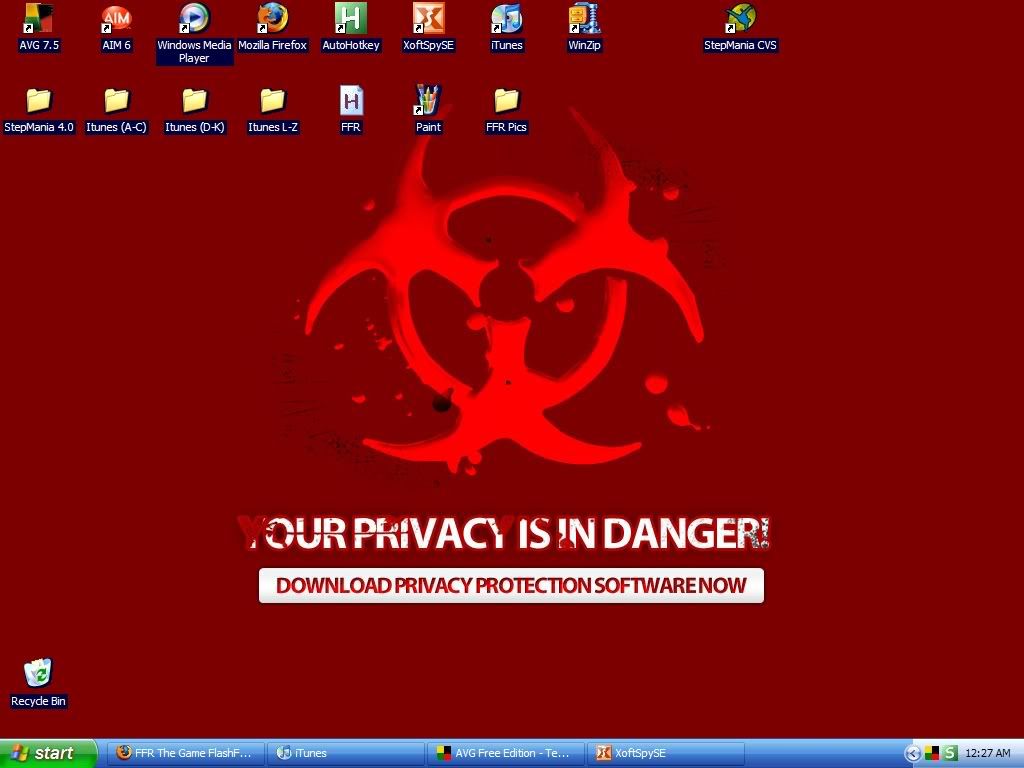
                  It is also a link that leads to a fake anti-virus program that is actually a virus. I have AVG, McAfee, and XoftSpy all running. Nothing is giving me any more signs of a problem, which is good, but I can't get rid of this thing on my bg. Any more help?

                  Comment

                  • Zageron
                    Zageron E. Tazaterra
                    FFR Administrator
                    • Apr 2007
                    • 6592

                    #10
                    Re: Spyware issues

                    You have one of those retarted bugs that prevents you from changing your background. I had this problem once....
                    Tips:
                    Don't go to un-safe Crack sites.
                    Don't visit un-safe porn sites.
                    NEVER download cracks and boot the files in them. If the crack has an INFO file open that (using notepad). NEVER OPEN ANY EXEs in a crack file.

                    As for your desktop problem. You going to have to go deep into your registry to edit that setting. I'm afraid I can't recall where I had to go

                    Comment

                    • devonin
                      Very Grave Indeed
                      Event Staff
                      FFR Simfile Author
                      • Apr 2004
                      • 10120

                      #11
                      Re: Spyware issues

                      Don't go to un-safe Crack sites.
                      Don't visit un-safe porn sites.
                      And its so helpful that they label whether they are safe or not when you go there.

                      As an aside, according to a study that I heard about on a news radio show, something like only 12% of porn sites will attempt to stick you with malware, and something like 25% of music sites will.

                      Comment

                      • rshadow8888
                        FFR's Buizel
                        FFR Simfile Author
                        • Aug 2005
                        • 3120

                        #12
                        Re: Spyware issues

                        Originally posted by Zageron
                        You have one of those retarted bugs that prevents you from changing your background. I had this problem once....
                        Tips:
                        Don't go to un-safe Crack sites.
                        Don't visit un-safe porn sites.
                        NEVER download cracks and boot the files in them. If the crack has an INFO file open that (using notepad). NEVER OPEN ANY EXEs in a crack file.

                        As for your desktop problem. You going to have to go deep into your registry to edit that setting. I'm afraid I can't recall where I had to go
                        I really need to find some way to lock my keyboard so my dad can't get on my computer...

                        Well, the desktop problem seems to be all that is left for my issues. I looked around but still have no idea where to go.

                        Comment

                        • scottish
                          FFR Veteran
                          FFR Simfile Author
                          • Apr 2003
                          • 3257

                          #13
                          Re: Spyware issues

                          Go to Run
                          Type in Regedit
                          Go to HKEY_USERS
                          Go to default
                          Go to control panel
                          Go to desktop
                          You should then see something there for wallpaper. Type in the path of the wallpaper you want to change it to. Ex: c:\documents\myphoto.jpg\bmp etc.
                          Hopefully that works. Restart windows afterwards.

                          Comment

                          • rshadow8888
                            FFR's Buizel
                            FFR Simfile Author
                            • Aug 2005
                            • 3120

                            #14
                            Re: Spyware issues

                            Nope, that didn't work. Oh well, at least I know now to search on google for desktop hijacking.

                            Comment

                            • scottish
                              FFR Veteran
                              FFR Simfile Author
                              • Apr 2003
                              • 3257

                              #15
                              Re: Spyware issues

                              Just look around then. There is many things that could help you out with this. Try to first find solutions that don't involve you downloading things. If nothing seems to work, then try downloads. Much safer that way.

                              Comment

                              Working...