


I have no idea what happened, but when I logged on to the internet this morning, I got like 100 pop-up tabs. I have downloaded and used adware, spybot, and avg (there were Trojans too). The pop-ups are a little less frequent now (once every 15 mins or so), but it also shuts my internet down each time too. Anyone have a little advice?
-
-
Re: Spyware issues
¯\(◕_◕)/¯ -
Re: Spyware issues
Grab windows defender, spysweeper and Xoftspy while you are at it.
Cheers,
SynthlightComment
-
Re: Spyware issues
or buy a mac.Comment
-
Re: Spyware issues
System Restore.
Comment
-
Re: Spyware issues
Bump and double post because I have more problems. I have no idea what is wrong now, but more spyware issues gave me a hacker. He even changed my desktop bg
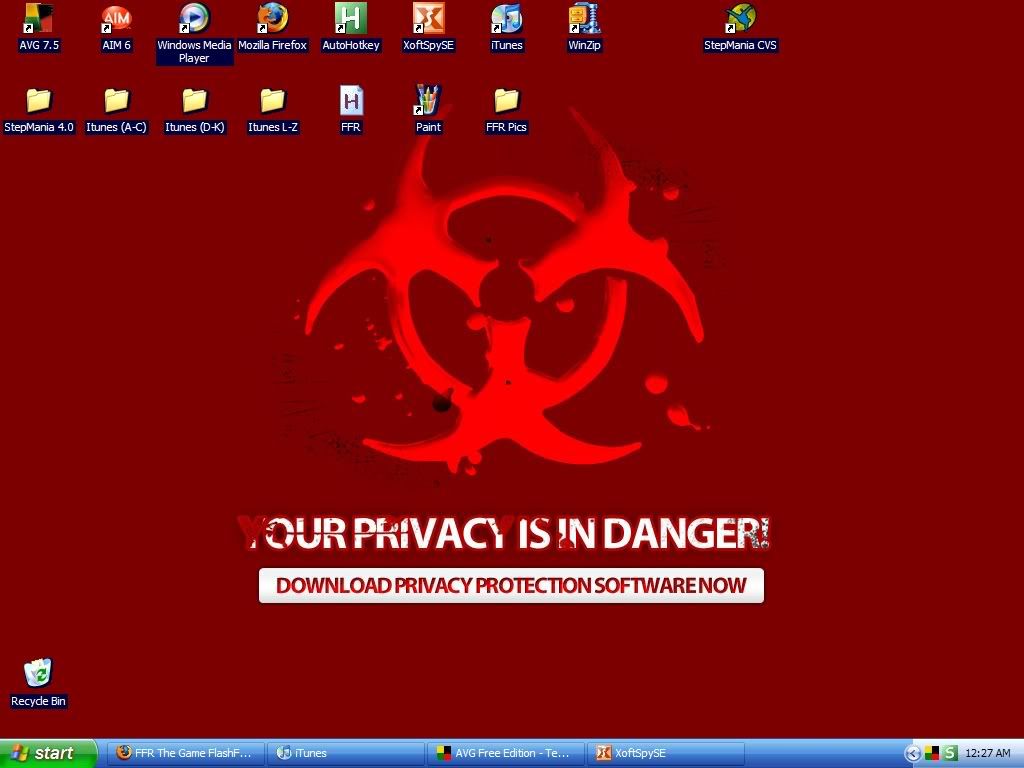
It is also a link that leads to a fake anti-virus program that is actually a virus. I have AVG, McAfee, and XoftSpy all running. Nothing is giving me any more signs of a problem, which is good, but I can't get rid of this thing on my bg. Any more help?Comment
-
Re: Spyware issues
You have one of those retarted bugs that prevents you from changing your background. I had this problem once....
Tips:
Don't go to un-safe Crack sites.
Don't visit un-safe porn sites.
NEVER download cracks and boot the files in them. If the crack has an INFO file open that (using notepad). NEVER OPEN ANY EXEs in a crack file.
As for your desktop problem. You going to have to go deep into your registry to edit that setting. I'm afraid I can't recall where I had to go
Comment
-
Re: Spyware issues
And its so helpful that they label whether they are safe or not when you go there.Don't go to un-safe Crack sites.
Don't visit un-safe porn sites.
As an aside, according to a study that I heard about on a news radio show, something like only 12% of porn sites will attempt to stick you with malware, and something like 25% of music sites will.Comment
-
Re: Spyware issues
Go to Run
Type in Regedit
Go to HKEY_USERS
Go to default
Go to control panel
Go to desktop
You should then see something there for wallpaper. Type in the path of the wallpaper you want to change it to. Ex: c:\documents\myphoto.jpg\bmp etc.
Hopefully that works. Restart windows afterwards.Comment
-
Re: Spyware issues
Nope, that didn't work. Oh well, at least I know now to search on google for desktop hijacking.Comment
-
Re: Spyware issues
Just look around then. There is many things that could help you out with this. Try to first find solutions that don't involve you downloading things. If nothing seems to work, then try downloads. Much safer that way.Comment


Comment