


Free From the Beep!
Have you ever been playing a harder song on Flash Flash Revolution, either mashing or just playing and noticed that your computer will make a BEEP sound and freeze for a second, depriving you of your precious combo, and consequently your patience?
Do you use AutoHotKey scripts (A program that re-maps keys on your keyboard to a different spot) because of this problem, and find yourself using awkward keys that require you putting your arms in awkward positions to play?
Do you just hate that BEEP no matter what the task you're performing?
Well, I have a fix for you!
Why does it go Beep and/or Lag?
The reason your computer beeps, is because it is having trouble registering all the keys you press, alongside with following this tutorial it is good to understand some of the reasons why it beeps:
- Number Lock is on (Top left of your number pad on the far right side of your keyboard). Your computer will improperly read the keys you are pressing and beep and/or read keys irregularly.
- The BEEP. Your computers software will cause your motherboard (brain of the computer) to beep when you hold down or press keys too quickly.
- Your computer is outdated, please ensure that you have a fast enough computer and/or internet connection to play Flash Flash Revolution the Game.
You see, all you have to do is disable the BEEP noise, and it will free you from the horrid sound, and the lag! This can be done in three ways, just follow these simple instructions:
Command Prompt
1. Go to Command Prompt by clicking Start -> All Programs -> Accessories -> Command Prompt and enter : net stop beep
Device Manager
1. Open the Device Manager. You can do this from RIGHT CLICKING My Computer -> Properties -> Hardware -> Device Manager.
2. Show Hidden Devices. You can do this from View -> Show hidden devices. This is where I was stuck: I didn’t know the Device Manager had hidden devices.
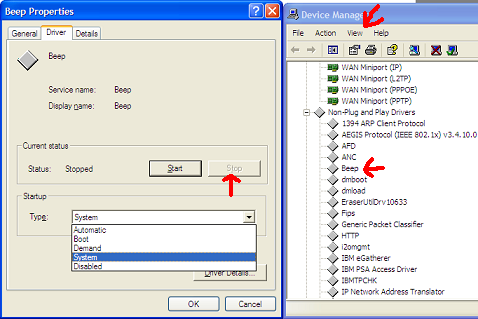
3. Under Non-Plug and Play Drivers, open the properties for Beep. Go to Driver -> Stop, and the beeping will cease. I think you can also Disable the device, but for me, this would require a reboot.
Turning off Numlock
The beeping/lag problem can sometimes be solved as easily as turning off your Number Lock Key (Top Left part of the Number Pad located on the far right side of your keyboard) , though this solution is not permanent.
I hope these solutions will help you with your problem, if this problem persists you can always Contact the Flash Flash Revolution administrators or ask about it here.
Enjoy Playing FFR!
(Also please note that this will disable any warning signals your computer may send you aswell, so use at your own discretion)
Some information in this guide was taken from http://Intelliot.com and was written by Elliot Lee on December 20th 2006.
Have you ever been playing a harder song on Flash Flash Revolution, either mashing or just playing and noticed that your computer will make a BEEP sound and freeze for a second, depriving you of your precious combo, and consequently your patience?
Do you use AutoHotKey scripts (A program that re-maps keys on your keyboard to a different spot) because of this problem, and find yourself using awkward keys that require you putting your arms in awkward positions to play?
Do you just hate that BEEP no matter what the task you're performing?
Well, I have a fix for you!
Why does it go Beep and/or Lag?
The reason your computer beeps, is because it is having trouble registering all the keys you press, alongside with following this tutorial it is good to understand some of the reasons why it beeps:
- Number Lock is on (Top left of your number pad on the far right side of your keyboard). Your computer will improperly read the keys you are pressing and beep and/or read keys irregularly.
- The BEEP. Your computers software will cause your motherboard (brain of the computer) to beep when you hold down or press keys too quickly.
- Your computer is outdated, please ensure that you have a fast enough computer and/or internet connection to play Flash Flash Revolution the Game.
You see, all you have to do is disable the BEEP noise, and it will free you from the horrid sound, and the lag! This can be done in three ways, just follow these simple instructions:
Command Prompt
1. Go to Command Prompt by clicking Start -> All Programs -> Accessories -> Command Prompt and enter : net stop beep
Device Manager
1. Open the Device Manager. You can do this from RIGHT CLICKING My Computer -> Properties -> Hardware -> Device Manager.
2. Show Hidden Devices. You can do this from View -> Show hidden devices. This is where I was stuck: I didn’t know the Device Manager had hidden devices.
3. Under Non-Plug and Play Drivers, open the properties for Beep. Go to Driver -> Stop, and the beeping will cease. I think you can also Disable the device, but for me, this would require a reboot.
Turning off Numlock
The beeping/lag problem can sometimes be solved as easily as turning off your Number Lock Key (Top Left part of the Number Pad located on the far right side of your keyboard) , though this solution is not permanent.
I hope these solutions will help you with your problem, if this problem persists you can always Contact the Flash Flash Revolution administrators or ask about it here.
Enjoy Playing FFR!
(Also please note that this will disable any warning signals your computer may send you aswell, so use at your own discretion)
Some information in this guide was taken from http://Intelliot.com and was written by Elliot Lee on December 20th 2006.


 Thanks, One of my other computers does that. It's annoying as hell.




Comment