
How to add a header and background:

Collapse
This topic is closed.
X
X
 
  • Time
  • Show
Clear All
new posts
  • madmatt621
    Banned
    • Dec 2006
    • 3000

    #1

    How to add a header and background:

    Because I've been in the middle of conversations of people who can't figure out how to add their header or background to their profile, I was like "What the hell" and decided to make a thread dedicated to that.

    Step 1: Open up the front page of FFR Forums and click on "User CP" on the banner towards the top of the page.



    Step 2: Under where it says "User CP" and "Options & Settings", click on "Your FFR Profile" and it'll take you to your profile.



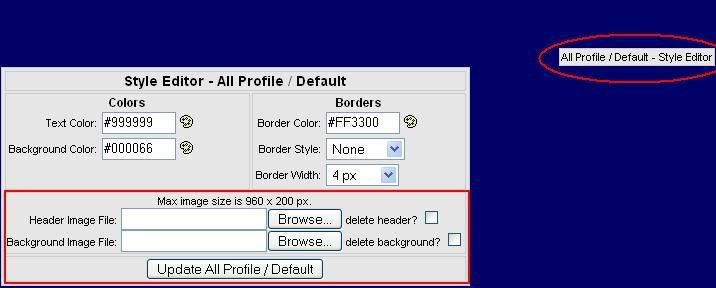
    Step 3: After your profile loads, look to the top right of your profile and you should see where it says "All Profile/Default - Style Editor". Click on that and a window will open. Whether you are opening a header or a background, you will have to upload it and it will have to be a max size of 960 x 200 px. If you want to delete your header or background to put up a new one, check mark next to where it says "Delete Header" or "Delete Background".
    Last edited by madmatt621; 10-15-2007, 09:27 AM.
  • JasonKey
    FFR Underseer
    • Jul 2003
    • 2643

    #2
    Re: How to add a header and background:

    good post .. thanks!

    Originally posted by Synthlight
    I will be fix this. No worries. It happened during a version upgrade.
    Cheers,
    Synthlight

    Comment

    • madmatt621
      Banned
      • Dec 2006
      • 3000

      #3
      Re: How to add a header and background:

      Yea...Your welcome. I had to remake it because I posted it before, but I couldn't find it.

      Comment

      • hoochan
        woah shrooms
        • Nov 2005
        • 3838

        #4
        Re: How to add a header and background:

        What's the size limit for backgrounds?

        Comment

        • GamerShadow
          FFR Player
          • Oct 2005
          • 2534

          #5
          Re: How to add a header and background:

          Mine is something around 900 by 2000, and it lets me have it. So I am assuming no height limit?
          Note to self Finish.

          Comment

          • Summerschool
            ~
            • Feb 2012
            • 320

            #6
            Re: How to add a header and background:

            No width/height limit, but it is automatically resized in proportion to max 900px X 200px. File size limit is 512KB.

            Comment

            • ichigoxhero
              FFR Player
              • Apr 2007
              • 9

              #7
              Re: How to add a header and background:

              copy and paste a pic u like from inter net or were ever then save it into ur pics finally go to ffr ac and press browse on backround image file double click on the pic you want. if u have a color as a backround take the color off or u wont be able to see ur real backround

              Comment

              • madmatt621
                Banned
                • Dec 2006
                • 3000

                #8
                Re: How to add a header and background:

                Originally posted by ichigoxhero
                copy and paste a pic u like from inter net or were ever then save it into ur pics finally go to ffr ac and press browse on backround image file double click on the pic you want. if u have a color as a backround take the color off or u wont be able to see ur real backround
                I did not know that.

                [/sarcasm]

                Work on your spelling and grammar.

                Comment

                • danny53x
                  AKA Yotipo
                  • Jan 2007
                  • 1008

                  #9
                  Re: How to add a header and background:

                  Could I make a tutorial on how to take a part of a background and edit exactly 960x200 out of it for a banner in Photoshop?

                  EDIT: http://www.flashflashrevolution.com/...93#post2025593
                  Last edited by danny53x; 02-11-2008, 04:36 PM.

                  Comment

                  • Misa_Amane
                    FFR Player
                    • Oct 2007
                    • 119

                    #10
                    Re: How to add a header and background:

                    took me forever & a day to figure out how to do this.
                    thx.
                    ^^

                    Comment

                    • knuckles2224
                      Angel Island ♥
                      • Jun 2007
                      • 1530

                      #11
                      Re: How to add a header and background:

                      Lol, forums are helpful ,also the chats as well.


                      Originally posted by arrekusuof93
                      Knuckles you're just a rebel

                      Comment

                      • branden-c
                        FFR Player
                        • Apr 2008
                        • 26

                        #12
                        Re: How to add a header and background:

                        Any one need a nice backround and banner i can make for free on my own time PM me

                        Comment

                        • jose_negron
                          FFR Player
                          • Mar 2008
                          • 1

                          #13
                          Re: How to add a header and background:

                          Originally posted by branden-c
                          Any one need a nice backround and banner i can make for free on my own time PM me
                          i need one for my background

                          Comment

                          • OMG its HIM
                            FFR Player
                            • Mar 2008
                            • 667

                            #14
                            Re: How to add a header and background:

                            can i also added, bmp's not allowed on headers and backgrounds ;D
                            AAA-5
                            FC's-102
                            Best AAA-Pita
                            Best FC-Piano Etude

                            <He Got Laid
                            Originally posted by djshox
                            I will kill you.

                            Comment

                            • kashin_123
                              FFR Player
                              • Jun 2008
                              • 1

                              #15
                              Re: How to add a header and background:

                              i do

                              Comment

                              Working...
