


Hmm, havent really posted on the forums before or anything, but I can never seem to connect to multiplayer. I have perfect internet connection but everytime i click multiplayer, it says Can't Connect. any suggestions?
-
-
Re: Multiplayer problems
The multiplayer .swf attached to the game at the moment isn't functioning. However, you can play multiplayer here: http://www.flashflashrevolution.com/...ity/FFR_MP.php -
Re: Multiplayer problems
And if you're using that link and are still having connection issues, it is due to your wireless network settings. You need to open ports 8080 and 8082 for input/output. There are steps to do this in the changelog thread I believe. There are a couple threads around that have mentioned this if you look for them.
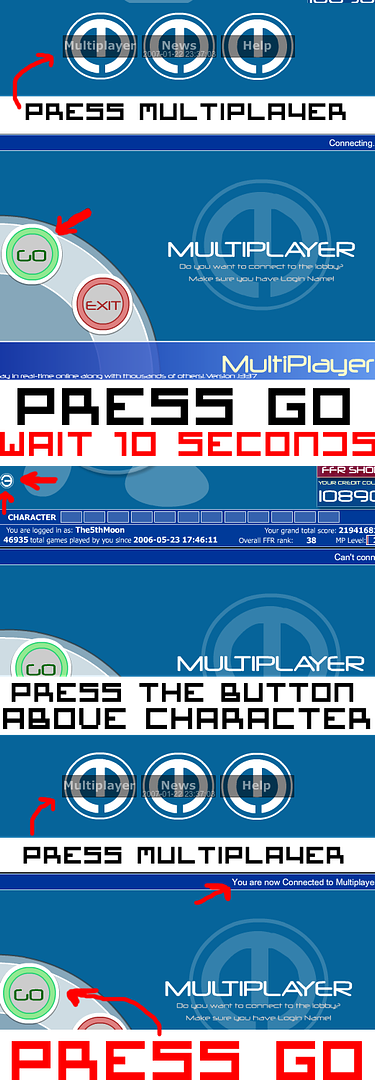
Or you can follow these steps to get in if you can't or won't open the ports.
1) Go to the game here: http://www.flashflashrevolution.com/...ity/FFR_MP.php
2) Open up MP
3) Wait about ten seconds
4) If you have not connected, hit the little button that appeared in the game window, this will close MP
5) Goto step 2 and repeat the process. Eventually you will connect.Back to "Back to Earth"
Originally posted by FoJaROriginally posted by FoJaROriginally posted by MalReynoldsComment
-
Re: Multiplayer problems
Thank you! the second one worked just fine!
Comment
-
Re: Multiplayer problems
I actually made a pic tutorial on this since the person I was telling it too didn't understand.

Comment


Comment