


I've created a formula in Microsoft Excel that will calculate your AAAs, FCs, Blackflags (BFs), Booflags (Boo), and Single Digit Goods (SDGs) automatically. It's quite useful for stat calculation, and you don't have to recalculate anything if you add/remove any song from the list.
Estimated Time to Completion: 3 minutes
Here's what you do:
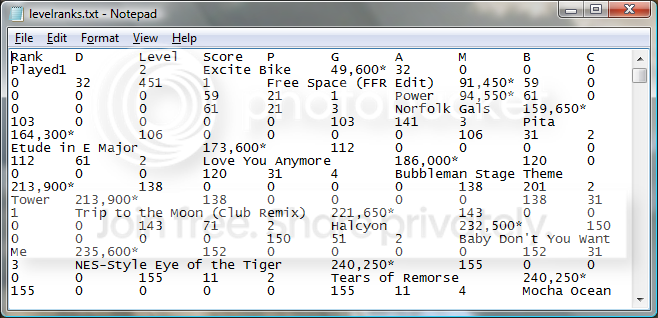
1) If you're a subscriber, simply copy and paste your levelranks into a txt file and save it. It should look something like this:
If you aren't, use one of my excel files as a template for your scores or get a subscriber to help you out. My "Basic" Excel file is just like the one in this tutorial. The regular Excel file is the one I use, and includes columns for both the Date and Actual Difficulty. I've filled in all Advanced Difficulties from the original post of jimerax's thread.
2) Drag the text file onto your spreadsheet. It should automatically take care of all formatting and you'll see your data separated into 11 columns, 'A' through 'K'. If you somehow get the Text Import Wizard, just go with the defaults.

3) Delete the row with Token #9 (If you have it).
4) Right-click on column 'E' and choose 'Insert' to put a new column between your Score and Perfects columns and name it whatever you choose (I chose 'Status').
5) Copy the formula below.
6) Paste the formula into the first cell of your Status column (E2).
7) Copy that cell, select all other cells in the column, and paste it.
Formula:
=IF(D2=0,"",IF(AND(A2=1,F2=K2,SUM(G2:J2)=0),"AAA",IF(AND(F2=K2,SUM(G2:I2)=0,J2=1),"Boo",IF(AND(F2=K2-1,SUM(H2:J2)=0,G2=1),"BF",IF(AND(SUM(H2:J2)=0,G2>1,G2<10),"SDG",IF(AND(SUM(F2:H2)=K2, I2=0,K2>31),"FC", ""))))))
Why Do All Of This?
The answer is simple. This is an easy way to count how many of each AAA, SDG, etc. you have without hunting through the list manually.
Copy these formulas and paste them into a cell of your choice to obtain a count of each status:
For AAAs: =COUNTIF(E:E, "AAA")
For SDGs: =COUNTIF(E:E, "SDG")
For Blackflags: =COUNTIF(E:E, "BF")
For Booflags: =COUNTIF(E:E, "Boo")
All songs: =COUNT(A:A)
Not FC'd %: =(N9/N7)/10 (See screenshot below)
Here's what mine looks like sorted By Status:

EXTRA CREDIT:
If you stopped right now, the sorting will be pretty messed up because of those asterisks on the FC'd songs. Let's fix that, shall we?
1) Hit Ctrl+F and you should see the Find and Replace box.
2) Click the 'Replace' tab and type: ~* in the 'Find what' input box (the ~ symbol should be right below your Esc key).
3) Put whatever you want (it can be nothing at all) to replace that asterisk in the 'Replace with' input box and hit the 'Replace All' button.
If you didn't put anything in the 'Replace with' field, all of your scores will now sort properly.
Community: Is there a better way to find out if the user has a FC other than specifying that "Misses = 0" when the score is > 0?
This is slightly flawed, because a score could show up as FC even if the song wasn't fully completed and Autofail was on...but who does that?
Estimated Time to Completion: 3 minutes
Here's what you do:
1) If you're a subscriber, simply copy and paste your levelranks into a txt file and save it. It should look something like this:
If you aren't, use one of my excel files as a template for your scores or get a subscriber to help you out. My "Basic" Excel file is just like the one in this tutorial. The regular Excel file is the one I use, and includes columns for both the Date and Actual Difficulty. I've filled in all Advanced Difficulties from the original post of jimerax's thread.
2) Drag the text file onto your spreadsheet. It should automatically take care of all formatting and you'll see your data separated into 11 columns, 'A' through 'K'. If you somehow get the Text Import Wizard, just go with the defaults.
3) Delete the row with Token #9 (If you have it).
4) Right-click on column 'E' and choose 'Insert' to put a new column between your Score and Perfects columns and name it whatever you choose (I chose 'Status').
5) Copy the formula below.
6) Paste the formula into the first cell of your Status column (E2).
7) Copy that cell, select all other cells in the column, and paste it.
Formula:
=IF(D2=0,"",IF(AND(A2=1,F2=K2,SUM(G2:J2)=0),"AAA",IF(AND(F2=K2,SUM(G2:I2)=0,J2=1),"Boo",IF(AND(F2=K2-1,SUM(H2:J2)=0,G2=1),"BF",IF(AND(SUM(H2:J2)=0,G2>1,G2<10),"SDG",IF(AND(SUM(F2:H2)=K2, I2=0,K2>31),"FC", ""))))))
Why Do All Of This?
The answer is simple. This is an easy way to count how many of each AAA, SDG, etc. you have without hunting through the list manually.
Copy these formulas and paste them into a cell of your choice to obtain a count of each status:
For AAAs: =COUNTIF(E:E, "AAA")
For SDGs: =COUNTIF(E:E, "SDG")
For Blackflags: =COUNTIF(E:E, "BF")
For Booflags: =COUNTIF(E:E, "Boo")
All songs: =COUNT(A:A)
Not FC'd %: =(N9/N7)/10 (See screenshot below)
Here's what mine looks like sorted By Status:
EXTRA CREDIT:
If you stopped right now, the sorting will be pretty messed up because of those asterisks on the FC'd songs. Let's fix that, shall we?
1) Hit Ctrl+F and you should see the Find and Replace box.
2) Click the 'Replace' tab and type: ~* in the 'Find what' input box (the ~ symbol should be right below your Esc key).
3) Put whatever you want (it can be nothing at all) to replace that asterisk in the 'Replace with' input box and hit the 'Replace All' button.
If you didn't put anything in the 'Replace with' field, all of your scores will now sort properly.
Community: Is there a better way to find out if the user has a FC other than specifying that "Misses = 0" when the score is > 0?
This is slightly flawed, because a score could show up as FC even if the song wasn't fully completed and Autofail was on...but who does that?





Comment