
is there any way to change the standalone options?

Collapse
X
 
  • Time
  • Show
Clear All
new posts
  • infinity.
    sideways 8
    • Sep 2007
    • 1706

    #1

    is there any way to change the standalone options?

    when i press control and the left arrow (when my finger slips on accident..) the standalone restarts the engine, and it's becoming too annoying. can i change the hotkey combination or whatever? hnnnnnnnnng
    signatures are for nerds

    nerds
  • Ohaider
    FFR Veteran
    • Jun 2012
    • 2893

    #2
    Re: is there any way to change the standalone options?

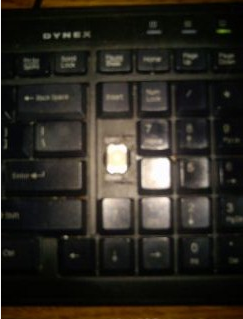
    had a problem with deleting selected material on SM 5 editor, so i just pulled out the delete key
    Last edited by Ohaider; 08-12-2012, 08:10 PM.
    Comment

    • qqwref
      stepmania archaeologist
      FFR Simfile Author
      • Aug 2005
      • 4092

      #3
      Re: is there any way to change the standalone options?

      Just go into the settings menu (which can be found on the main screen, not the ingame/results screen) and change the key for Restart or Quit. I agree, the default settings make it a little too easy to end the song.
      Best AAA: Policy In The Sky [Oni] (81)
      Best SDG: PANTS (86)
      Best FC: Future Invasion (93)

      Comment

      • infinity.
        sideways 8
        • Sep 2007
        • 1706

        #4
        Re: is there any way to change the standalone options?

        Originally posted by qqwref
        Just go into the settings menu (which can be found on the main screen, not the ingame/results screen) and change the key for Restart or Quit. I agree, the default settings make it a little too easy to end the song.
        this is a standalone shortcut, not an engine setting
        signatures are for nerds

        nerds

        Comment

        • TC_Halogen
          Rhythm game specialist.
          FFR Simfile Author
          FFR Music Producer
          • Feb 2008
          • 19376

          #5
          Re: is there any way to change the standalone options?

          I don't think there's a way to disable that particular hotkey from being executed in Flash, unfortunately. I used to run into the same issue occasionally when playing DF/JK, as I would somehow make the window go full-screen.

          Comment

          • Pseudo Enigma
            ごめんなさい (/ω\)
            • Aug 2012
            • 2290

            #6
            Re: is there any way to change the standalone options?

            solution: Rip out the start key (before this becomes a problem), rip out the CTRL key, and for the love of god rip out the ALT key too before this becomes worse.

            Comment

            • TC_Halogen
              Rhythm game specialist.
              FFR Simfile Author
              FFR Music Producer
              • Feb 2008
              • 19376

              #7
              Re: is there any way to change the standalone options?

              that's not really much of a solution considering said person might, you know... use their keyboard for something other than FFR, lol

              Comment

              • justin_ator
                🥓<strong><span style="col
                • Mar 2007
                • 7648

                #8
                Re: is there any way to change the standalone options?

                eh, you have two ctrl and alt keys, remove the two causing the problem. Enter is a different story though, but I never had an issue with that one.

                Comment

                • infinity.
                  sideways 8
                  • Sep 2007
                  • 1706

                  #9
                  Re: is there any way to change the standalone options?

                  i play on a laptop.. don't really want to take off keys
                  signatures are for nerds

                  nerds

                  Comment

                  • Ohaider
                    FFR Veteran
                    • Jun 2012
                    • 2893

                    #10
                    Re: is there any way to change the standalone options?

                    Originally posted by TC_Halogen
                    that's not really much of a solution considering said person might, you know... use their keyboard for something other than FFR, lol
                    no such thing

                    Comment

                    • justin_ator
                      🥓<strong><span style="col
                      • Mar 2007
                      • 7648

                      #11
                      Re: is there any way to change the standalone options?

                      well, aside from some killer coding in an engine from velocity that'd somehow null it, or changing your key setup, I don't really know what else to tell you. As far as I know those hotkey combinations are flash specific and embedded within the flash player's programming, meaning you aren't going to be able to change them (or I could be totally wrong who knows)

                      Comment

                      • Pseudo Enigma
                        ごめんなさい (/ω\)
                        • Aug 2012
                        • 2290

                        #12
                        Re: is there any way to change the standalone options?

                        Originally posted by TC_Halogen
                        that's not really much of a solution considering said person might, you know... use their keyboard for something other than FFR, lol
                        there's uses for a keyboard other than FFR?

                        Comment

                        • foxfire667
                          The FFRchiver
                          FFR Music Producer
                          • Jun 2009
                          • 2169

                          #13
                          Re: is there any way to change the standalone options?

                          I used to have issues with this sort of thing, and I have the solution to the problem. You are going to need one program called AutoHotKey in order for this to work.

                          Once installed, copy this code I made and save it as an .ahk file:
                          Code:
                          #MaxThreadsBuffer ON
                          SetNumlockState AlwaysOn
                          ^up::Send {up}
                          ^down::Send {down}
                          ^left::Send {left}
                          ^right::Send {right} 
                          ^q::Send {q}
                          ^w::Send {w}
                          ^e::Send {e}
                          ^r::Send {r}
                          ^t::Send {t}
                          ^y::Send {y}
                          ^u::Send {u}
                          ^i::Send {i}
                          ^o::Send {o}
                          ^p::Send {p}
                          ^a::Send {a}
                          ^s::Send {s}
                          ^d::Send {d}
                          ^f::Send {f}
                          ^g::Send {g}
                          ^h::Send {h}
                          ^j::Send {j}
                          ^k::Send {k}
                          ^l::Send {l}
                          ^z::Send {z}
                          ^x::Send {x}
                          ^c::Send {c}
                          ^v::Send {v}
                          ^b::Send {b}
                          ^n::Send {n}
                          ^m::Send {m}
                          !up::Send {up}
                          !down::Send {down}
                          !left::Send {left}
                          !right::Send {right}
                          !q::Send {q}
                          !w::Send {w}
                          !e::Send {e}
                          !r::Send {r}
                          !t::Send {t}
                          !y::Send {y}
                          !u::Send {u}
                          !i::Send {i}
                          !o::Send {o}
                          !p::Send {p}
                          !a::Send {a}
                          !s::Send {s}
                          !d::Send {d}
                          !f::Send {f}
                          !g::Send {g}
                          !h::Send {h}
                          !j::Send {j}
                          !k::Send {k}
                          !l::Send {l}
                          !z::Send {z}
                          !x::Send {x}
                          !c::Send {c}
                          !v::Send {v}
                          !b::Send {b}
                          !n::Send {n}
                          !m::Send {m}
                          !space::send {1}
                          ^!q::Send {q}
                          ^!w::Send {w}
                          ^!e::Send {e}
                          ^!r::Send {r}
                          ^!t::Send {t}
                          ^!y::Send {y}
                          ^!u::Send {u}
                          ^!i::Send {i}
                          ^!o::Send {o}
                          ^!p::Send {p}
                          ^!a::Send {a}
                          ^!s::Send {s}
                          ^!d::Send {d}
                          ^!f::Send {f}
                          ^!g::Send {g}
                          ^!h::Send {h}
                          ^!j::Send {j}
                          ^!k::Send {k}
                          ^!l::Send {l}
                          ^!z::Send {z}
                          ^!x::Send {x}
                          ^!c::Send {c}
                          ^!v::Send {v}
                          ^!b::Send {b}
                          ^!n::Send {n}
                          ^!m::Send {m}
                          LWin::Send {1}
                          RWin::Send {2}
                          AppsKey::Send {NumpadDiv}
                          Numpad7::Run SnippingTool
                          #MaxThreadsPerHotkey 20
                          Drag the ahk file into AutoHotKey.exe and your problem should be fixed! Essentially what this file does is null ANY control + key, alt + key, or control + alt + key combinations (instead making the result only the key you wanted by itself). This also negates the use of your windows keys (as well as any possible shortcut action imaginable) so be sure to close AHK on your taskbar when you are finished playing FFR.

                          Bonus: if you have Windows 7 32bit, pressing 7 on the number pad will launch the snipping tool for screenshots. It doesn't want to work on my 64bit for some odd reason.

                          I hope this helps you!
                          SM pack archiver | 1.5 Billion Club | Etterna Online: [Register]

                          Comment

                          Working...
