
So I was surfing profiles and I come across a nice avatar picture. So I decide to ninja it and I right click on it but instead of the regular box coming up it was invisible so I tried guess where in the invisible box the "save image as" was, but after I clicked into the invisible box (could only see the outlines of box) all the pictures on the site avatars, smileys, profile pics all poofed gone, and I cant see skill tokens, my background is grey, I cant see anyone's (including mine) avatars or tokens, wtf did I do. Can you please tell me how to undo this? I tried clearing catch and reloading page still no dice.
Very Strange Problem Didnt see another thread for it
Collapse
X
-
Tags: None
-
Re: Very Strange Problem Didnt see another thread for it

^^^
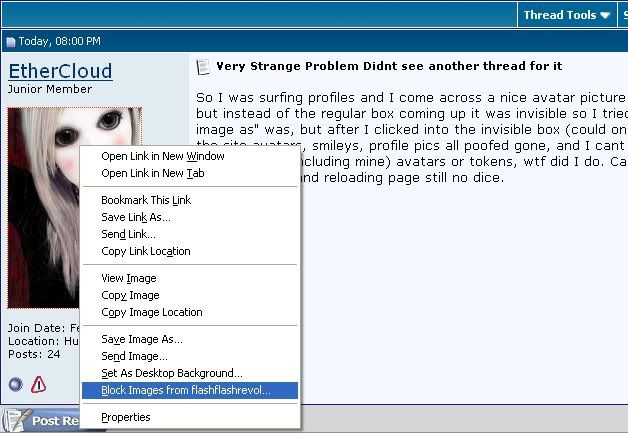
If you click this the side-affects are pretty much what you're describing. However i could not find a solution to your problem. Hope this steers you in the right direction.


-
Re: Very Strange Problem Didnt see another thread for it
What noisy said.
If you have ad-blocker or something similar, there's a good chance you blocked incoming images from the site.
LMFAO
I just realized nois-or-e posted an image to try to help you understand why you can't see images xD
What an idiot :P
Anyway, try right-clicking again to see if there's an option to view images from the site. I don't know what else to tell you if that doesn't help, because I don't know what browser you're using.
If all else fails, try another browser to see if you can view images. Then uninstall your original browser and reinstall it I guess.

Originally posted by sonic-fast-fingerscan someone clarrify what QFT means my friend told me its quit ****ing talking, but im not 100 percent sure
Originally posted by SynthlightI need a car that drives itself completely automated and I want it for free and it needs infinite gas mileage.
Cheers,
SynthlightComment
-
Re: Very Strange Problem Didnt see another thread for it
If you use Firefox:
If you use IE:Originally posted by Firefox HelpCheck image permissions
Firefox allows you to prevent images from loading for certain websites to make pages load faster. If you are having trouble viewing images:
1. At the top of the Firefox window, On the menu bar, click on the Tools menu, and select Options...Preferences....
2. Options - Preferences window, select the Content panel.
3. Make sure there is a check mark next to Load images automatically
4. Click on Exceptions... next to Load images automatically to open the Exceptions - Images window.
5. In the Exceptions - Images window, look at the list of sites. Make sure the sites with which you're having trouble are not in the list.
6. Click Close to close the Exceptions - Images window.
7. Click OK to close the Options window
Originally posted by IE HelpTo correct this issue, follow the methods that are described in this section in the order in which they are presented until the issue is resolved.
You may find it easier to follow the steps if you print this article first.
These methods are designed for beginning to intermediate computer users. After each method, refresh Internet Explorer to check whether the problem is resolved. If the problem is not resolved, try the next method.
Method 1: See whether pictures are available on another Web site
Sometimes the link to a picture on a Web site is broken, and that is why a picture is not being displayed. Visit another Web site to determine whether pictures are being displayed correctly on it. If they are being displayed correctly, then there is nothing wrong with Internet Explorer. Instead, the Web site that you are visiting might be broken.
If you can view pictures on another Web site, you are finished. If you do not see any pictures or if you cannot determine whether the Web site that you are visiting is broken, try clearing your temporary Internet files by using method 2.
Method 2: Clear temporary Internet files
Clearing your temporary Internet files creates more space on your hard disk. If your hard disk is close to being full, this could affect your ability to view pictures on a Web site.
To clear temporary Internet files, follow these steps:
Internet Explorer 7
1. Start Internet Explorer 7.
2. On the Tools menu, click Delete Browsing History.
3. In the Delete Browsing History dialog box, click Delete Files.
4. Click OK to close the Internet Options dialog box.
Internet Explorer 6 and earlier versions
1. On the Tools menu, click Internet Options.
2. On the General tab, click Delete Files under Temporary Internet files.
3. Click to select the Delete all offline content check box, and then click OK.
4. Click OK to close the Internet Options dialog box.
Check whether you can now see pictures. If you still cannot see pictures, try method 3.
Method 3: Verify that the Show Pictures option has not been turned off
If the Show Pictures option in Internet Explorer is turned off, you cannot see pictures. To determine whether the Show Pictures option is turned off, follow these steps:
1. On the Tools menu, click Internet Options.
2. Click the Advanced tab, and then verify that the Show Pictures check box is selected under Multimedia.
3. Click OK.
Check whether you can now see pictures. If you still cannot see pictures, try method 4.
Method 4: Enable scripting, ActiveX controls, cookies, and Java programs
Enable scripting, ActiveX controls, cookies, and Java programs to make sure that your computer is set up to enable Web pages to run the way that they were designed to.
To do this, follow these steps:
1. On the Tools menu, click Internet Options.
2. Click the Security tab, and then click Default Level (if it is available) for the zone that contains the Web page (for example, the Internet zone).
3. If you are using Internet Explorer 6, click the Privacy tab, and then click Default (if it is available).
Check whether you can now see pictures. If you still cannot see pictures, you must do some advanced troubleshooting. If you are not comfortable with advanced troubleshooting, you might want to check the "Next Steps" section for some other resources that you can use for help.fgsfdsComment
-
Re: Very Strange Problem Didnt see another thread for it
He raised a legitimate "this is funny" by pointing out that you posted an image to show explain why she can't see images on the site, but calling you an idiot was simply inappropriate. I think he owes you an apology.Comment
-
Re: Very Strange Problem Didnt see another thread for it
Tee hee.
I meant 'what an idiotic post'.
You're really smart, judging by your awesome unique score tournie idea :O
Forgive me?
(P.S. That was a really stupid post xD)
<3
Originally posted by sonic-fast-fingerscan someone clarrify what QFT means my friend told me its quit ****ing talking, but im not 100 percent sure
Originally posted by SynthlightI need a car that drives itself completely automated and I want it for free and it needs infinite gas mileage.
Cheers,
SynthlightComment

Comment